PostSharp
[MVVM]
Eliminate the INotifyPropertyChanged boilerplate and more.
- Stop losing time writing boilerplate for INotifyPropertyChanged, commands, dependency properties, undo/redo, ...
- Never forget a PropertyChanged notification again.
- Keep your business logic super clean.

INotifyPropertyChanged
2
3
4
5
6
7
8
9
10
11
12
13
14
15
16
17
18
[NotifyPropertyChanged]
public class CustomerViewModel
{
    public CustomerModel Customer { get; set; }

    public string FullName
    {
        get
        {
            // Change in Customer, Customer.FirstName or
            // Customer.PrincipalAddress.Line1 will trigger the event.
            return string.Format("{0} {1} from {2}",
                Customer?.FirstName,
                Customer?.LastName,
                Customer?.PrincipalAddress?.FullAddress);
        }
    }
}
Get rid of 95% of the INotifyPropertyChanged boilerplate and never miss a notification again.
-
Support for composite properties and child objects
-
Consistent and reliable
-
Fully customizable
-
Integrates with other MVVM frameworks: MVVM Light and Caliburn.Micro
Command
2
3
4
5
6
7
8
9
10
11
12
13
14
15
[NotifyPropertyChanged]
public partial class MainWindow : Window
{
    bool isReadOnly;

    [Command]
    public ICommand SaveCommand { get; private set; }

    private void ExecuteSave()
    {
        // Details skipped.
    }

    public bool CanExecuteSave => !this.isReadOnly;
}
Stop creating a class every time you define a command.
-
Easy, based on custom attributes and naming conventions.
-
Validated at build time.
-
CanExecute property integrates with the [NotifyPropertyChanged] aspect.
Dependency & Attached Properties
2
3
4
5
6
7
8
9
10
11
12
13
14
15
16
public partial class FancyTextBlock : UserControl
{
    public FancyTextBlock()
    {
        InitializeComponent();
    }

    [DependencyProperty]
    [Required]
    public string Text { get; set; } = "Hello, world.";

    [DependencyProperty]
    public Brush FancyBorderBrush { get; set; }

    public void OnFancyBorderBrushChanged() { /* Handle changes here. */}
}
Dependency properties that still look like properties.
-
Support for composite properties and child objects.
-
Consistent and reliable.
-
Fully customizable.
-
Integrates with PostSharp code contracts.
-
Integrates with other MVVM frameworks.
Code Contracts
2
3
4
5
6
7
8
9
10
11
12
13
14
15
16
17
public interface IReferralService
{
    [return: Required]
    Referral CreateReferral([Required] string name, [Url] string url);
}


public class ReferralService : IReferralService
{
    public Referral CreateReferral(string name, string url)
    {
        // Contracts are automatically inherited from the interface.
    }

    [Required]
    public string ConnectionString { get; set; }
}
The most readable way to validate values at run-time.
-
Works with parameters, output parameters, return values, fields, and properties.
-
Works on interfaces and abstract methods. Automatically inherited.
-
As fast as hand-written code.
-
Customizable and localizable exception messages.
-
Integrates with the [DependencyProperty] aspect.
Weak Event
2
3
4
5
6
7
8
9
10
11
12
13
14
15
16
static class MyEventSource
{
    [WeakEvent]
    public static event EventHandler MyEvent;
}


class MyEventClient
{
    public MyEventClient()
    {
        MyEventSource.MyEvent += (sender, e) => Console.WriteLine("Oops!");

        // No need for IDisposable and handler unregistration.
    }
}
Avoid the most common source of memory leaks in .NET.
-
As simple as a custom attribute.
-
Apply to all events in your project in a single line.
Undo/Redo
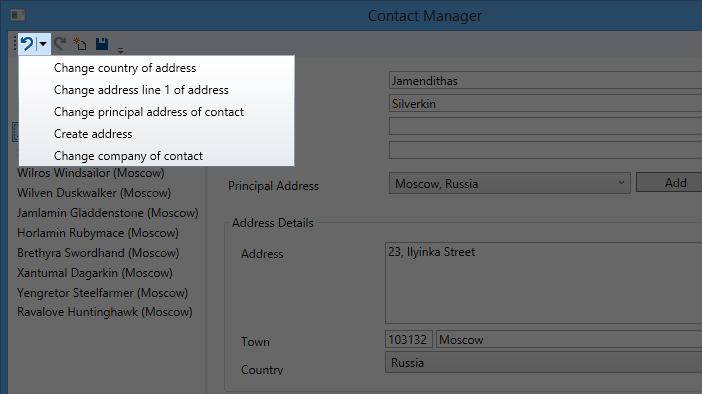
Give your users the familiar Undo/Redo experience without breaking the bank.
-
Undo/Redo any object state change.
-
Handle multiple changes as one step.
-
Expose in the UI with built-in or custom controls.

![PostSharp [Ultimate]](/images/products-shadow/ultimate.png?etag=2ea31357d8e42379dca6bc992036e85a)